O2C 303 · PRACTITIONER PROCESS MAP
How does O2C run in SAP?
A practitioner-provided view of the Order-to-Cash process across sales, fulfilment, billing, accounts receivable, and Finance.
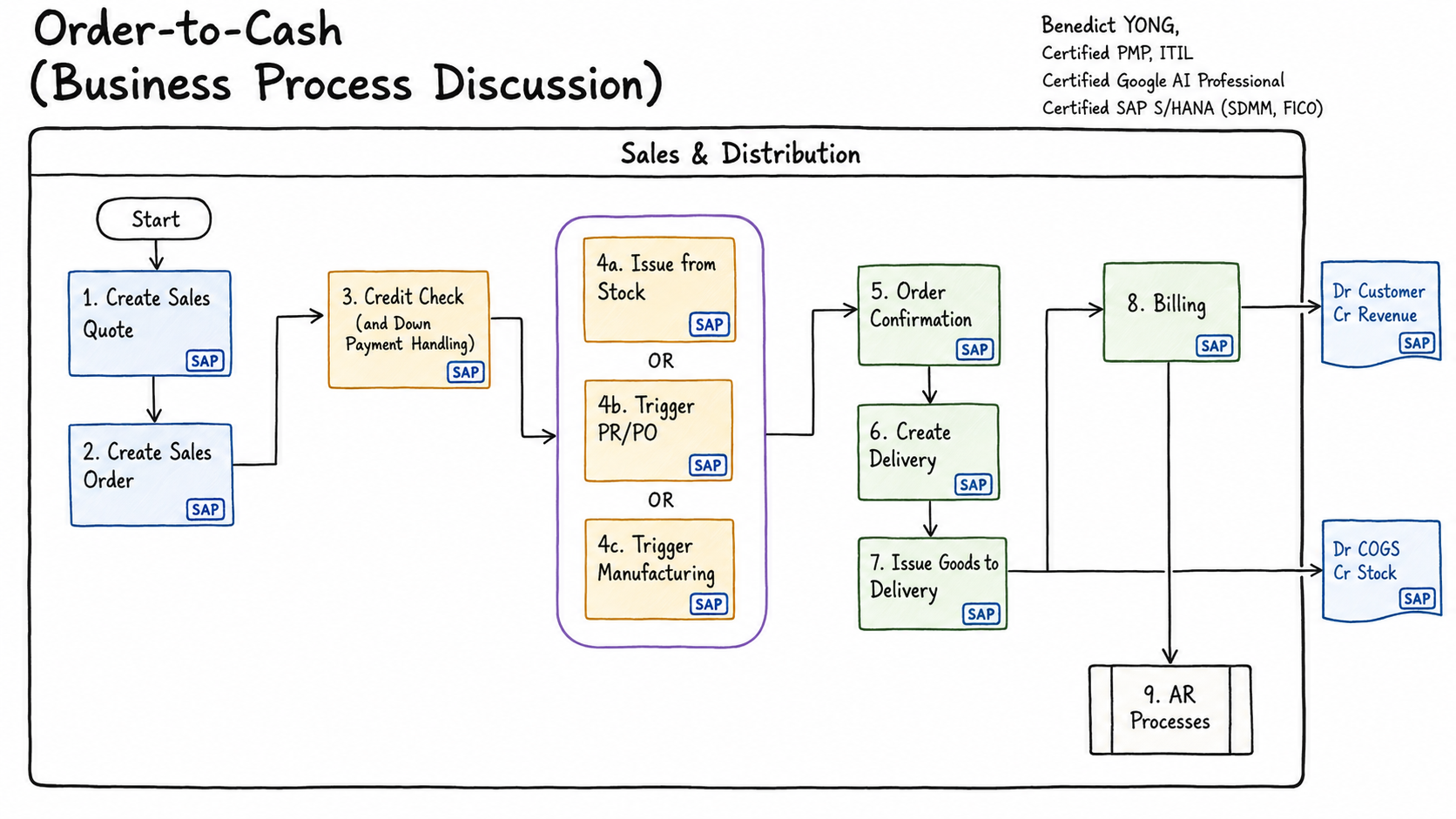
READ THE DIAGRAM
From customer request to accounts receivable
Follow the numbered boxes in the supplied diagram. Quotation is optional; credit and payment handling are checked before one of the supply branches, then order confirmation, delivery, goods issue, billing, and Accounts Receivable follow.
- 01
Create sales quotation
When pre-sales commitment is needed, capture the customer, materials, quantities, dates, pricing, validity, and commercial terms. The quotation is a traceable offer, not yet the executable demand; confirm its status and expiry before relying on it.
- 02
Create sales order
Convert the accepted request into the binding sales document. Confirm the sold-to and ship-to parties, items, quantities, requested dates, plant, pricing, tax, payment terms, and customer purchase-order reference, because these drive fulfilment and billing.
- 03
Check credit and payment handling
Before supply is released, verify credit status, exposure, payment terms, down-payment requirements, incompletion, and any delivery or billing block. Resolve the named reason and preserve the approval or release evidence; a saved order is not necessarily executable.
- 04
Select the supply path
Choose one alternative fulfilment route: available stock, external procurement through PR/PO, or manufacturing. The route determines the linked documents, dates, ownership, and exceptions to monitor. It is one numbered decision, not three consecutive customer-facing steps.
- 05
Order confirmation
Confirm the quantity and date that supply can genuinely support, then communicate the promise to the customer. Compare confirmed schedule lines with the requested commitment and investigate shortages, rescheduling, allocation, or supplier and production dependencies before progressing.
- 06
Create delivery
Create the outbound delivery when the confirmed demand is due and eligible. It organizes picking, packing, shipping-point activity, batch or serial-number capture, and delivery status; check that credit, blocks, stock, and predecessor status permit warehouse execution.
- 07
Issue goods to delivery
Post goods issue only when the shipment evidence is complete. This proves stock left the business, updates delivery and document-flow status, reduces inventory, and normally posts cost of goods sold; investigate quantity, valuation, or account-determination errors immediately.
- 08
Billing
Create the billing document from completed commercial and delivery evidence. Validate billed quantity, price, tax, payer, output, and posting status; billing creates the customer receivable and normally recognizes revenue, so billing blocks and pricing differences require explicit ownership.
- 09
Accounts Receivable processes
Manage the invoice as an open item until payment is identified and cleared. Monitor due date, ageing, payment reference, deductions, disputes, partial or residual items, and collection status. Payment receipt and clearing are downstream AR activities, not separate diagram numbers.
READ THE PROCESS
What the diagram is really saying
The numbered boxes show more than a document sequence. They expose four different responsibilities that must remain connected for the customer promise to become cash.
Turn an enquiry into an acceptable promise
The quotation is optional pre-sales evidence. The sales order creates executable demand. Pricing, availability, credit, and any down-payment requirement decide whether the business should accept and release that demand.
Choose one fulfilment path
Issue from stock, trigger procurement, or trigger manufacturing are alternatives—not three sequential steps. The choice changes lead time, ownership, connected documents, and the exceptions a practitioner must monitor.
Move from confirmation to consequential execution
Confirmation expresses the feasible quantity and date. The delivery organizes warehouse work. Post goods issue proves stock left, updates the document chain, and normally records inventory and cost-of-sales impact.
Create the receivable, then clear it
Billing converts fulfilled value into the invoice and accounting document. Accounts Receivable owns the open item, payment matching, deductions, disputes, residual items, and the final clearing evidence.
INSIDE THE SALES ORDER
Three foundations explain the downstream result
When the process diagram looks correct but the transaction behaves unexpectedly, inspect the structure, parties, and value mechanism before jumping to a configuration change.
Header, item, schedule line
Locate the data and status at the level where SAP actually determined the result.
Open anatomyPARTIESBusiness Partner and roles
Separate central identity, organizational extensions, and transaction responsibilities.
Open partner modelVALUEPricing mechanism
Trace procedure determination, condition accesses, calculation, and the financial hand-off.
Open pricingTHE CRITICAL BRANCH
Step 04 changes the middle of the process
The commercial process remains O2C, but demand may be served from stock, bought specifically, or manufactured. That choice changes the connected documents, lead time, ownership, and exception handling.
ACCOUNTING HAND-OFFS
The process crosses Finance at three different moments
Do not collapse inventory, revenue, and cash into one posting. Each event has different evidence, timing, ownership, and reversal behavior.
Inventory leaves the balance sheet and its cost reaches the income statement.
The invoice creates customer debt and recognizes the commercial value.
The receipt settles the customer open item when matched and cleared.
PRACTITIONER VIEW
What to watch across the chain
A real-world review follows the hand-offs and exceptions, not only the happy-path boxes.
Commercial integrity
Quotation reference, order type, partners, material, quantity, price, tax, requested date, and customer purchase order.
Promise and risk
ATP confirmation, delivery schedule, credit status, incompletion, block reasons, and any required down payment.
Supply strategy
Stock availability, procurement or production requirement, document linkage, dates, and ownership of the supply exception.
Execution evidence
Delivery status, picking, batch or serial capture, proof of shipment, goods issue, inventory reduction, and COGS posting.
Revenue quality
Billing due list, billed quantity, pricing copy, tax, account determination, invoice output, and accounting document.
Cash closure
Open-item ageing, payment reference, matching, deductions, disputes, residual items, and final clearing status.
WHEN THE CHAIN BREAKS
Start with the missing business evidence
The absent successor is usually a symptom. Locate the last trustworthy event before changing configuration.
Was demand executable?
Check confirmed schedule lines, delivery relevance, due date, rejection, incompletion, credit or delivery blocks, plant, shipping point, and preceding-document status.
Did the consequential event finish?
Check PGI or billing posting status, movement and account determination, valuation and customer master data, tax, posting period, and the application log.
Was cash identified and cleared?
Check the bank statement, customer and invoice reference, amount and currency, matching result, reason code, residual or partial item, dispute, and clearing document.
Connect the practitioner flow to the configuration decisions, dependencies, transport boundaries, and end-to-end proof required to make it work.