ORDER TO CASH · OBJECT MODEL
How is a sales document put together?
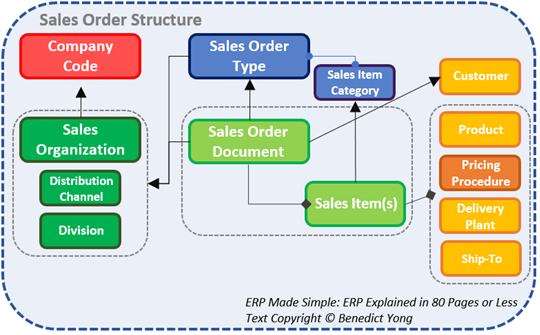
A sales order is not one flat record. Business context, header data, item data, and schedule lines work together so SAP can control commercial intent, product behavior, and fulfilment timing.
READ THE MODEL
Structure separates what is shared from what can vary
Start with the document context. Sales area and document type establish the selling organization, channel, division, number range, and the broad processing rules for the order. These values form the commercial frame that every item inherits unless SAP is explicitly designed to allow an exception.
Header data records the facts shared across the commitment: customer partners, currency, payment terms, requested dates, and common commercial conditions. Item data then records what is being sold and how that particular product behaves—material, quantity, plant, item category, price, delivery relevance, billing relevance, or rejection.
Schedule lines are the fulfilment evidence for an item. They hold requested and confirmed quantities and dates, and can split one item across several supply dates. Availability checking, requirements transfer, delivery relevance, and movement behavior are determined at this level, so a confirmed delivery date belongs to the schedule line rather than the document header.
Read successors by reference. Deliveries, billing documents, returns, and corrections do not replace the sales order; they retain links back to its header, item, and schedule-line evidence so the original customer commitment remains explainable.
OBJECT RESPONSIBILITY
Keep context, shared commitment, item behavior, and fulfilment evidence distinct
Each layer owns a different decision and proof. Place a value at the highest level where it remains true, then use lower levels for controlled differences.
Sales area and document type
Sales organization, distribution channel, division, and order type establish the organizational and processing frame.
Shared commercial data
Sold-to, payer, currency, requested dates, payment terms, and header conditions normally apply across the document.
Product-specific behavior
Material, order quantity, plant, item category, item pricing, rejection, and delivery or billing relevance can differ by line.
Quantity and timing evidence
Requested date, confirmed quantity, delivery date, requirements transfer, and movement relevance describe how an item will be fulfilled.
OPERATIONAL FLOW
What happens in SAP
Read the sequence as one connected business event, not as isolated transactions.
Establish the selling context
Sales area, transaction channel, document type, and customer establish which rules and master-data segments are eligible.
Determine item behavior
Order type, material item-category group, usage, and higher-level item drive item-category determination.
Create fulfilment detail
Item category and material MRP type help determine the schedule-line category and its availability, requirements, and delivery behavior.
Create referenced successors
Copy control and status rules connect quotations, orders, deliveries, billing documents, returns, and corrections without overwriting the source.
DESIGN & CONTROL
What shapes the result
These controls work together; a locally correct setting can still produce the wrong end-to-end outcome.
Document-level control
The sales document type influences number range, reference rules, blocks, credit behavior, delivery and billing proposals, and general processing.
Item-level control
The item category controls pricing, delivery and billing relevance, schedule lines, completion, returns, and other product-specific behavior.
Schedule-line control
The schedule-line category controls availability checking, requirements transfer, delivery relevance, movement direction, and quantity/date evidence.
DIAGNOSTIC EVIDENCE
Diagnose at the level where the result was determined
A header issue, item issue, and schedule-line issue can look similar to a user, but they originate from different inputs and control tables.
Sales area, order type, partners, currency, overall blocks, payment terms, and header status.
Material, plant, item category, pricing, rejection, delivery and billing relevance, and item status.
Requested and confirmed quantities, dates, schedule-line category, ATP result, requirements, and delivery status.
PROJECT MOMENT
One order, two products, three dates
A customer orders 20 standard chairs and 10 configured desks. The items receive different categories, and the desks split into two confirmed schedule lines because supply is available on different dates. One header still preserves the shared customer and commercial context.
- Header values are shared deliberately
- Each item behavior is explainable
- Confirmed dates sit on schedule lines
- Successors retain reference
See how these module capabilities connect across fulfilment branches, logistics documents, accounting entries, billing, and clearing.