EWM 202 · OBJECT MODEL
How do EWM warehouse objects fit together?
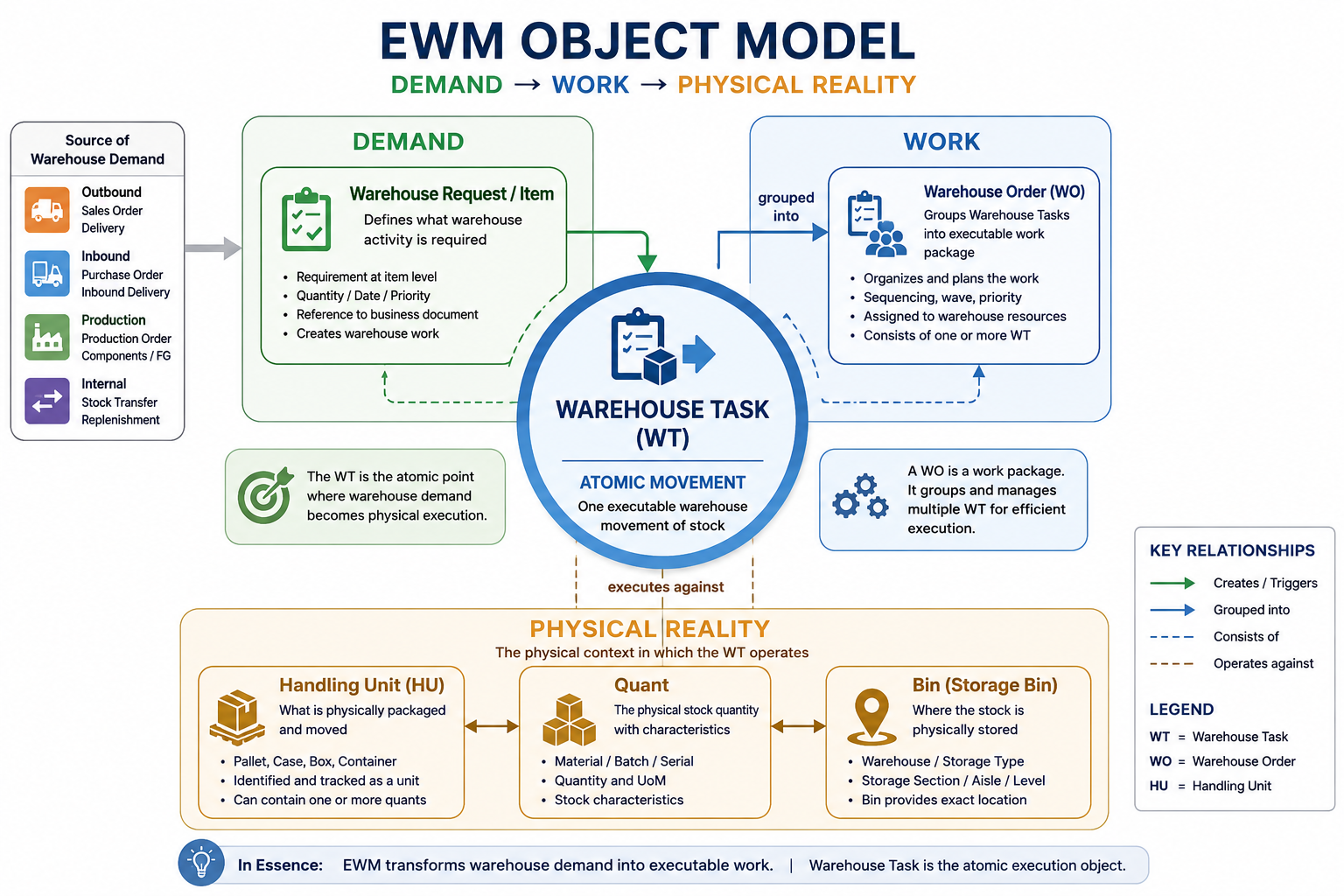
EWM is not one flat warehouse document. A warehouse request expresses work to be done; its items can create warehouse tasks; warehouse-order creation can group tasks into work packages. The work acts on stock held in bins and, where used, in handling units.
READ THE MODEL
Separate the warehouse map, stock identity, and execution documents
A purchase order has a header and items. EWM has several connected object families instead. Learn the relationship first, then inbound, outbound, replenishment, and inventory processes become easier to read and diagnose.
EWM ORIENTATION
Separate warehouse reality from warehouse work
First establish where and what the stock is; then trace the demand, task, and confirmation that change its physical state.
01 · PHYSICAL TRUTH
Structure, bin, quant & HUWhere stock can be, what attributes it carries, and how it is packaged02 · WORK CONTROL
Request, item & taskWhat the business asks the warehouse to do and the movement EWM determines03 · EXECUTION PROOF
Order & confirmationHow work is assigned and what physically happened
EWM OBJECT MAP
From warehouse layout to executable work
Arrows show the usual relationship, not an unconditional sequence. Configuration and scenario determine whether a task is created, when it is confirmed, and how it is grouped.
OBJECT RESPONSIBILITY
Keep layout, stock, packaging, and execution distinct
Each object family owns a different warehouse fact and proof. Diagnose the result at the layer that determined it.
Where can stock reside?
The warehouse number, storage type, storage section, activity area, and bin model the operating space. A bin is the precise location used for storage and work determination.
What stock is this?
A quant holds a product quantity with common stock characteristics such as batch, owner, party entitled to dispose, stock type, and relevant dates. One product can exist in many quants.
What is physically moved?
A handling unit represents a physical package such as a pallet, carton, or tote. An HU can contain products; HUs and product stock can each be moved by warehouse tasks.
Who must move what?
Requests describe demand, tasks describe an individual movement or change, and warehouse orders package eligible tasks for execution. The grouping is controlled by warehouse-order creation rules.
ONE REQUEST, SEVERAL POSSIBLE WORK STEPS
How document detail becomes physical evidence
The counts are deliberate: EWM can split one demand across stock, bins, HUs, tasks, and workers.
Create warehouse demand
An inbound delivery, outbound delivery order, internal transfer, or posting change creates a warehouse request where the selected scenario requires one.
State product-level demand
One request can have many items. Each item carries its own product, quantity, dates, references, and processing context.
Determine and execute movements
One item can create zero, one, or several tasks, for example when stock is split across source bins, HUs, or process steps.
Package work and record reality
Warehouse-order creation can group tasks for a worker or resource. Confirmation records the actual quantity, source, destination, HU, time, or approved exception.
One request is not one task
A delivery request can contain many items, and a single item may require multiple tasks because stock, handling units, locations, or process steps differ.
One warehouse order is not one request
Warehouse-order creation packages work according to configured rules. It may group compatible tasks; do not infer a one-to-one relationship from the document numbers.
A quant is not an HU
A quant is stock with shared identity and attributes. An HU is packaging. A pallet can hold multiple product quants, while a product can be spread over multiple HUs or bins.
DIAGNOSTIC EVIDENCE
Ask the question at the correct object level
“The stock is missing” can be a layout, stock, packaging, task, order, or integration question. Start with the last confirmed object, rather than changing stock or status first.
Source reference, item product and quantity, warehouse-process type, status, dates, and open quantity explain what EWM was asked to do.
Source and destination, selected stock/HU, queue, resource, warehouse order, confirmation, exception, and timestamps explain what EWM told the warehouse to do.
Bin location, product, batch, owner, stock type, available quantity, HU contents, and physical count explain what should be physically present.
PROJECT MOMENT
One outbound item, two picks, one work package
A delivery requests 12 units of a product. Six are available in one bin and six in a second bin, so EWM creates two pick tasks for the same request item. Warehouse-order creation assigns both tasks to one picker. The picker packs the units into a tote HU and confirms the work; the task evidence, HU contents, and delivery status must agree.
- One request item can create multiple tasks
- Tasks can be grouped into one work package
- Stock location and packaging remain separate facts
- Confirmation is the physical proof
Use the object model to follow a receipt from inbound demand through putaway.