TM 303 · SHARED PRACTITIONER MAP
How does the overall Basic TM process hang together?
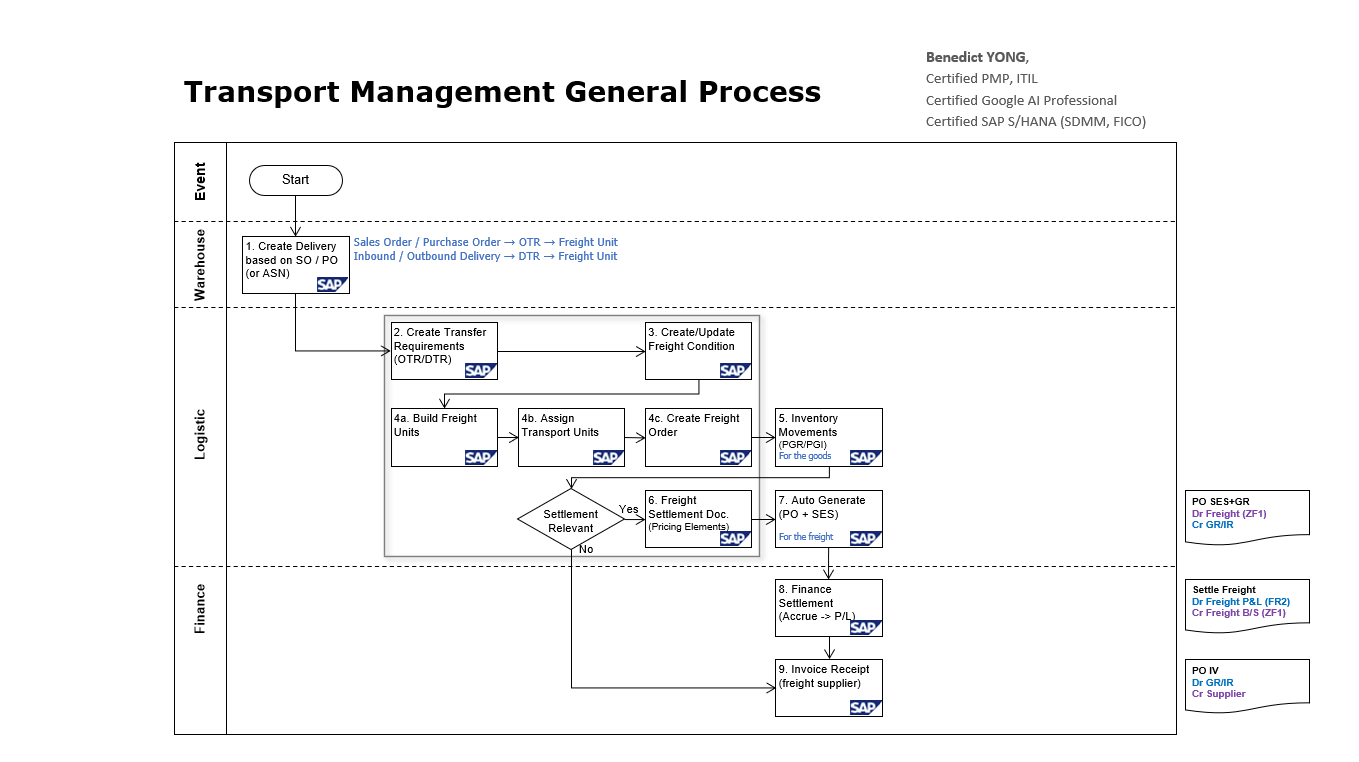
Outbound and inbound start from different upstream business contexts, then converge into one Basic TM engine: delivery-based demand becomes Freight Units, planning creates Freight Orders, execution supplies physical evidence, and freight cost reaches purchasing, invoice verification, and FI.
READ THE DIAGRAM
From delivery demand to freight invoice
Read the image from transportation demand through the shared logistics engine and into Finance. The numbered points explain the business record, TM decision, and evidence created at each hand-off.
- 01
Create the upstream business document and delivery
A Sales Order or Purchase Order may establish upstream context. In this Basic TM path, outbound or inbound delivery-based demand supplies the quantity, locations, dates, and status that TM plans against.
- 02
Create transportation demand
Relevant delivery data enters TM as transportation demand, often represented as a DTR depending on release and deployment. Confirm the source reference, transport dates, locations, product, and quantity before planning.
- 03
Apply FUBR and planning context
FUBR, master data, dates, locations, equipment, resources, carrier master data, freight agreements, and freight conditions give TM the context needed to build and cost an executable plan.
- 04
Build Freight Units
Freight-unit building converts eligible demand into durable planning units with quantities, locations, dates, compatibility, and references back to the business source.
- 05
Assign Freight Units to a Freight Order
Planning groups or separates Freight Units and assigns them to suitable transport capacity according to route, schedule, resource, equipment, capacity, constraints, and service requirements.
- 06
Execute the Freight Order
The Freight Order records the executable movement: stops, route, dates, resource, equipment, assigned carrier, planned charges, events, and operational status.
- 07
Record inventory and warehouse execution
Outbound execution supplies pick, pack, load, and PGI evidence; inbound execution supplies arrival, unload, GR, and putaway evidence. TM reconciles those physical events with the transport plan.
- 08
Create the Freight Settlement Document
Charge calculation turns agreements, rates, quantities, and charge types into expected carrier cost. The FSD carries approved settlement evidence forward.
- 09
Generate purchasing and service evidence
Where the integrated settlement design applies, the FSD creates or updates the purchasing follow-on documents used for carrier settlement, including PO and SES evidence.
- 10
Verify the supplier invoice and post to FI
Invoice Verification compares the freight supplier invoice with purchasing, service-entry, settlement, and accounting evidence, then posts the payable or routes a variance for resolution.
CHOOSE A CASE DEPTH
Follow one direction through the shared map
These pages deepen the business story; they do not replace the 303 anchor or introduce separate object models.
Outbound case
Sales Order context -> Outbound Delivery -> DTR -> FUBR / FU -> Freight Order -> PGI -> FSD -> PO / SES -> Supplier Invoice -> FI.
Follow outboundTM 303BInbound case
Purchase Order context -> Inbound Delivery -> DTR -> FUBR / FU -> Freight Order -> GR -> FSD -> PO / SES -> Supplier Invoice -> FI.
Follow inboundConnect delivery relevance to common planning, execution, costing, and settlement controls.