EWM 303 · PRACTITIONER INTEGRATION MAP
Where does EWM sit in the wider ERP process?
EWM receives warehouse-relevant enterprise demand, creates and confirms physical work, then returns evidence to delivery, inventory, and financial processes. Diagnose each boundary through its own documents rather than treating the chain as one status.
EVIDENCE CHAIN
Trace from business demand to integrated result
When statuses disagree, begin with the last trustworthy object and identify which owner controls the next hand-off.
MM, SD, PP, or stock process
Why material must enter, leave, stage, return, or change.
EWM demand
Warehouse-relevant items, dates, quantities, statuses, and references.
WT and WO
The atomic task and the executable work package.
Confirmation and exception
What physically occurred, when, where, and why it differed.
Delivery, inventory, and accounting
The downstream status or value consequence owned outside EWM.
TWO PRIMARY TRACES
Follow either direction through the same evidence method
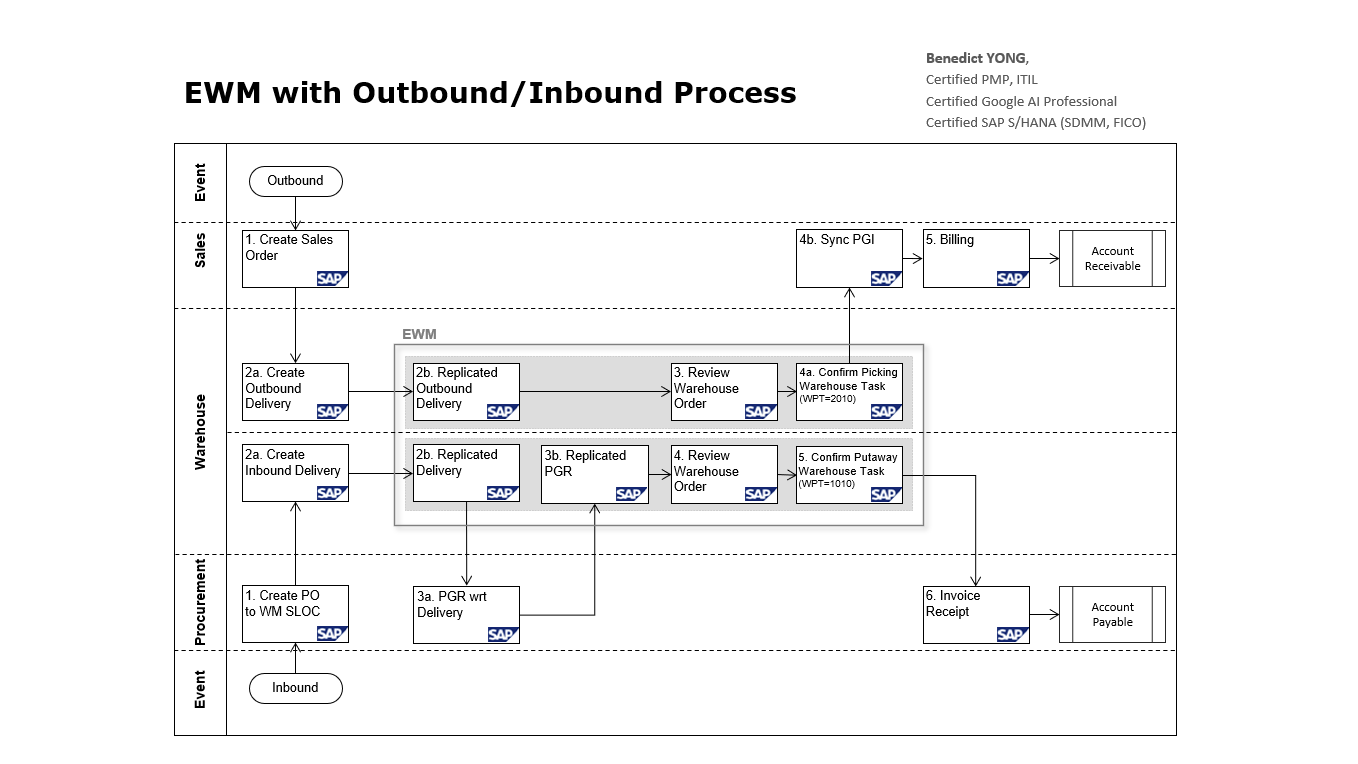
Outbound and inbound are counterparts. Each starts outside EWM, depends on physical warehouse proof, and continues into downstream ERP evidence.
Sales → Delivery → EWM → PGI → Billing → AR
Trace fulfilment readiness, WT/WO execution, picking confirmation, goods issue, and customer-side completion.
Follow outboundEWM 303B · INBOUNDPO → Inbound Delivery → EWM → PGR/GR → Invoice → AP
Trace expected receipt, product or HU identity, putaway WT/WO, receipt evidence, and supplier-side completion.
Follow inboundProduction integration
Trace staging or receipt demand, production supply area, consumption or receipt events, and warehouse confirmation.
Quality integration
Trace inspection relevance, stock type, usage decision or release, and whether EWM availability agrees.
Transportation integration
Trace door, staging, loading, HU, delivery, and transport status without treating them as interchangeable.
Finance boundary
Determine whether the event changed only EWM position or also caused inventory valuation and accounting evidence.
Use the evidence chains as the proof baseline for warehouse configuration.
READ THE DIAGRAM
Follow the diagram's exact outbound and inbound numbering
The two lanes use their own numbering. The labels below preserve the diagram exactly; Accounts Receivable and Accounts Payable are unnumbered outcomes.
Outbound · Sales to Accounts Receivable
- 1
Create Sales Order
Sales records the customer demand with the correct customer, material, quantity, date, shipping terms, and delivery relevance. Validate sales-order status, schedule lines, blocks, and warehouse-relevant item context; the order is the commercial source, not yet proof that warehouse work can begin.
- 2a
Create Outbound Delivery
Create the outbound delivery to turn eligible sales demand into warehouse- and shipping-relevant execution demand. Check due date, quantity, plant, shipping point, delivery blocks, picking relevance, and predecessor status; the delivery supplies the reference that EWM must receive consistently.
- 2b
Replicated Outbound Delivery
EWM receives the outbound delivery context and creates the warehouse-relevant request or comparable execution reference. Reconcile delivery number, item, product, quantity, dates, status, and error or queue evidence; “replicated” is the diagram terminology, while the integration mechanism depends on deployment.
- 3
Review Warehouse Order
Review how outbound Warehouse Tasks are created and grouped into the executable Warehouse Order. Check task creation, source-stock determination, warehouse-process type, wave or release status, queue, resource assignment, and order rule; a delivery existing in EWM does not alone prove that picking work is executable.
- 4a
Confirm Picking Warehouse Task (WPT=2010)
Confirm the actual pick using the product or handling unit, source bin, quantity, resource, time, and approved exception reason. Validate batch or serial identity, short pick, damage, stock type, and reversal behavior; the confirmation is the physical evidence that supports the next delivery and goods-issue status.
- 4b
Sync PGI
Use confirmed outbound execution to support synchronization of post goods issue and the corresponding delivery and inventory evidence. Check the delivery status, PGI result, quantity, posting date, stock reduction, interface message, and reversal chain; warehouse confirmation and financial inventory impact are related but distinct evidence.
- 5
Billing
Create billing only from eligible delivery and goods-issue evidence. Validate billing relevance, delivered quantity, price, tax, payer, output, and posting status; a warehouse-complete pick is not by itself a billable commercial outcome.
- →
Account Receivable
The posted customer invoice creates the Accounts Receivable and related accounting result. Monitor invoice reference, due date, payment, deduction, dispute, and clearing evidence so the outbound chain remains traceable from sales demand through warehouse proof to commercial closure.
Inbound · Procurement to Accounts Payable
- 1
Create PO to WM SLOC
Procurement creates the purchase order for the warehouse-managed storage location with the supplier, material, quantity, date, plant, storage location, price, and receipt conditions. Check release status, expected delivery, account assignment where relevant, and supplier communication before the inbound process is expected to start.
- 2a
Create Inbound Delivery
Create or receive the inbound delivery to record the expected receipt and make it available for warehouse execution. Validate supplier reference, product or handling-unit context, expected quantity, date, quality requirements, and delivery status; this is the receipt expectation, not the proof that goods arrived.
- 2b
Replicated Inbound Delivery
EWM receives the inbound delivery context and creates the warehouse-relevant inbound request or comparable execution reference. Reconcile delivery number, item, product, expected quantity, status, and interface or queue evidence; the exact integration technology and timing vary by deployment.
- 3a
PGR wrt Delivery
Post goods receipt with reference to the delivery at the posting point defined by the inbound scenario. Validate received quantity, stock type, valuation, posting date, quality or inspection relevance, and reversal treatment; goods receipt establishes inventory and often GR/IR evidence even when putaway work remains open.
- 3b
Replicated PGR
Synchronize the receipt evidence to EWM as shown in the diagram, then reconcile product, quantity, stock type, posting status, and message evidence. Exact timing and mechanism are scenario-dependent; do not assume EWM putaway confirmation and ERP goods receipt occur at the same instant.
- 4
Review Warehouse Order
Review how putaway Warehouse Tasks are created and grouped into the executable Warehouse Order. Check warehouse-process type, destination determination, task creation, queue, resource assignment, handling-unit status, and exceptions; receipt evidence does not prove that stock reached its intended bin.
- 5
Confirm Putaway Warehouse Task (WPT=1010)
Confirm the product or handling unit, quantity, destination bin, resource, time, and any approved putaway difference. Validate final bin, stock type, handling-unit identity, damage or quality status, and reversal behavior; this is the physical proof that received stock is available in its controlled location.
- 6
Invoice Receipt
Verify the supplier invoice against purchase-order and receipt evidence. Check quantity, price, tax, prior invoices, tolerance result, block reason, and invoice status; invoice verification creates or blocks the liability independently of whether warehouse putaway is technically complete.
- →
Account Payable
A valid supplier invoice creates the Accounts Payable liability and related accounting result. Track due date, payment block, proposal, approval, bank execution, and clearing document so the inbound chain remains explainable from expected receipt through warehouse proof to supplier settlement.