How does B2R execute through the period?
B2R connects three concurrent lanes: Planning & Performance establishes cost plan and budget authority; project release is used only where its object model requires it. Operations creates commitments and source events; Accounting and SAP Controlling (CO) turn those events into reconciled cost, margin, and management evidence.
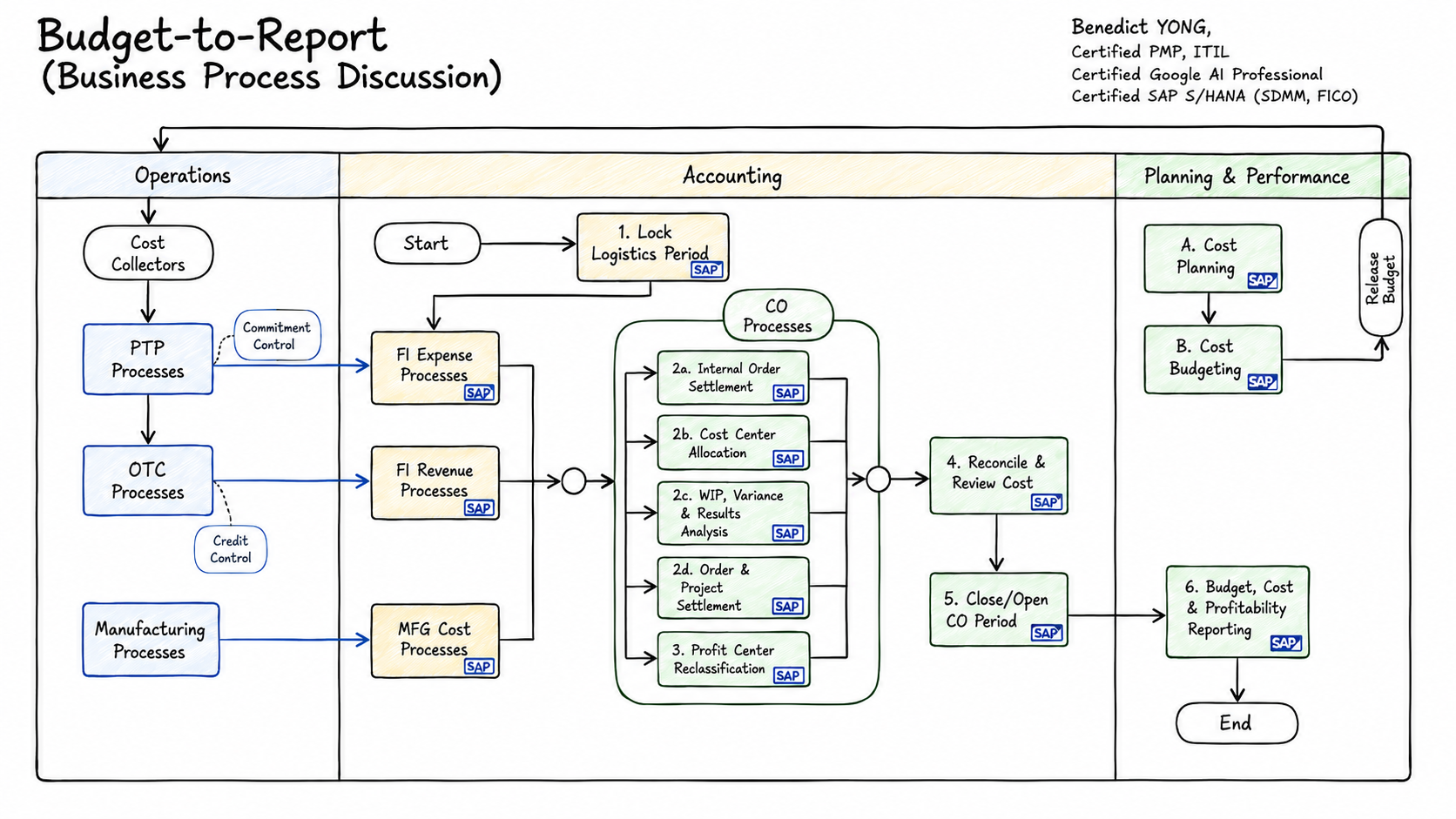
READ THE DIAGRAM
Follow the month-end CO and B2R sequence
Read the operating map from logistics cut-off through the applicable CO close branches, reconciliation, period control, and management reporting. Steps 2a–2d are parallel CO processing branches; the map has no standalone step 4.
- 1
Lock logistics period
Establish the close population by confirming that P2P, O2C, manufacturing, warehouse, and inventory source events are complete enough for the selected period. Check posting-period status, late-document treatment, interface failures, and named owner exceptions before CO processing begins; unresolved source activity must remain visible to the close owner.
- 2a
Internal order settlement
Settle eligible temporary internal orders only after reviewing their status, settlement rule, receiver, period, and remaining balance. Retain the run log and investigate rejected, incomplete, or unexpected residual amounts; the result should move collected cost to the approved responsible receiver without obscuring the source order.
- 2b
Cost center allocation
Run the approved activity allocation, distribution, assessment, or universal-allocation sequence to distribute shared cost on a controlled basis. Validate sender and receiver selection, driver or tracing factor, activity quantity, rate, period, run status, and rerun or reversal state; prove both the sender reduction and receiver receipt.
- 2c
WIP, variance, and results analysis
For applicable production, service, sales-order, or project objects, calculate WIP or results analysis, variance, and valuation before settlement. Confirm object status, period, cost and quantity completeness, valuation method, calculation log, and exception list; an incomplete source object can produce a technically successful but misleading close result.
- 2d
Order and project settlement
Settle eligible production, internal-order, and project balances using the approved receiver and capitalization or expense treatment. Check settlement profile and rule, receiver validity, percentage or amount, object status, period, prior runs, and the settlement log; retain exceptions until the residual balance is understood and owned.
- 3
Profit center reclassification
Apply the configured profit-center reclassification or reporting adjustment only where the reporting design requires it. Validate the source and target view, rule, period, posting or reporting result, and reversal treatment; then prove that the adjusted management view still reconciles to accounting and source-object evidence.
- 4
Reconcile and review cost
Reconcile FI and CO values, sender and receiver totals, open or unsettled balances, commitments, and production or project status before sign-off. Explain each material difference by amount, cause, age, owner, and resolution date, preserving the source-to-report trail rather than accepting a matching high-level total alone.
- 5
Close/Open CO period
Approve the relevant CO-close evidence, then control reruns, reversals, and late corrections through the agreed roles and calendar. Close the current period only when exceptions have an explicit disposition and evidence trail; open the next period with the intended access and posting controls in place.
- 6
Budget, cost, and profitability reporting
Report cost plan, budget baseline, released amount, commitment, actual cost, available amount, forecast, variance, and margin with the accountable owner, decision, and action date. Tie each material variance to the supporting source and close evidence; a forecast can trigger a budget request but never overwrites authorization.
THREE PRACTICAL CONTROL RAILS
Start with operating cost, then govern and extend it
These are additive control rails, not industry labels. Start with recurring operating cost, apply the budget-control rail, then add project, capital, or production objects only when the business needs them.
Cost centers and internal orders
Build a cost-center hierarchy, plan period cost manually or by upload, and compare plan, commitment, and actual. Use internal orders for temporary cross-cost-center or cross-year activity, then settle cost back to the responsible cost centers.
Authority and availability
Turn planned demand into approved authority, apply release only where the selected object model supports it, control commitments and actuals, govern changes, and report the current budget position.
PS WBS, networks, and PP orders
Add PS for project or capital work and PP for production cost collection, WIP, variance, and settlement where the selected cost objects require them. Rail 1 and Rail 2 remain the common control foundation.
THREE OPERATING LANES
Budget authority controls the operation; CO explains the result
Read this as a control map, not one technical document chain. The selected object’s allowed budget is the control input to operational consumption; actual cost and close evidence flow back to management reporting.
Plan and authorize
Prepare the cost and activity plan, then approve the budget baseline. Use release only for object models that support it, especially project/WBS control; do not present it as a universal cost-center or internal-order step.
Commit and execute
P2P creates commitments and supplier costs; O2C supplies revenue context; manufacturing and warehouse activity create material, quantity, inventory, and production-order evidence. Availability control acts before an irreversible commitment or posting.
Collect, close, explain
FI records cost and revenue. CO assigns accountable objects, allocates shared cost, values incomplete production, settles temporary objects, reconciles the result, and supplies cost and profitability evidence.
CONTROL SIGNALS
Keep the records distinct in every report and review
Approved budget, release, tolerance, exception route, approver, and effective scope explain what may be consumed.
Commitment, actual, source document, CO object, status, period, and reversal explain what has been used or is expected to be used.
Cost plan, forecast, variance, WIP, settlement, margin, accountable owner, and corrective action explain what the result means.
READ THE MAP BY RAIL
The same closing logic uses different objects
Rail 1 uses cost centers and internal orders; Rail 2 uses WBS and networks; Rail 3 uses PP production orders with WIP, variance, and settlement. The B2R report keeps the common budget-control view while CO preserves each object’s native accounting evidence.
- Project release is not a cost posting
- A commitment is not an actual cost
- Cost planning is not budget authority
- CO close evidence makes the management report explainable
SAP REFERENCE BOUNDARY
Validate the selected solution
Budget availability control, planning functions, workflows, and planning products vary by SAP edition, release, and licensed scope.