How does a budget-control model fit together?
B2R is not one budget number. It connects a controlled responsibility object, approved authority, released capacity, consumption evidence, availability checks, changes, and accountable action.
READ THE MODEL
Separate the budget boundary from evidence that consumes it
Start with the responsible budget object. It defines the accountable scope, owner, period, currency, and policy boundary against which authority and consumption will be assessed. The plan around that object describes expected need; it helps management anticipate demand, but it is not spending authority.
Approved budget and release are the authority records. The baseline records the authorized limit, while release makes some or all of it currently available for use. A requisition, purchase order, contract, payroll event, project posting, or journal can then create commitment or actual consumption without changing the approved boundary itself.
Read the control result last. Availability control compares the defined authority basis with consumption and produces a warning, block, or escalation. Forecast and reporting explain the likely outcome, but a transfer, supplement, return, or release change needs its own governed decision.
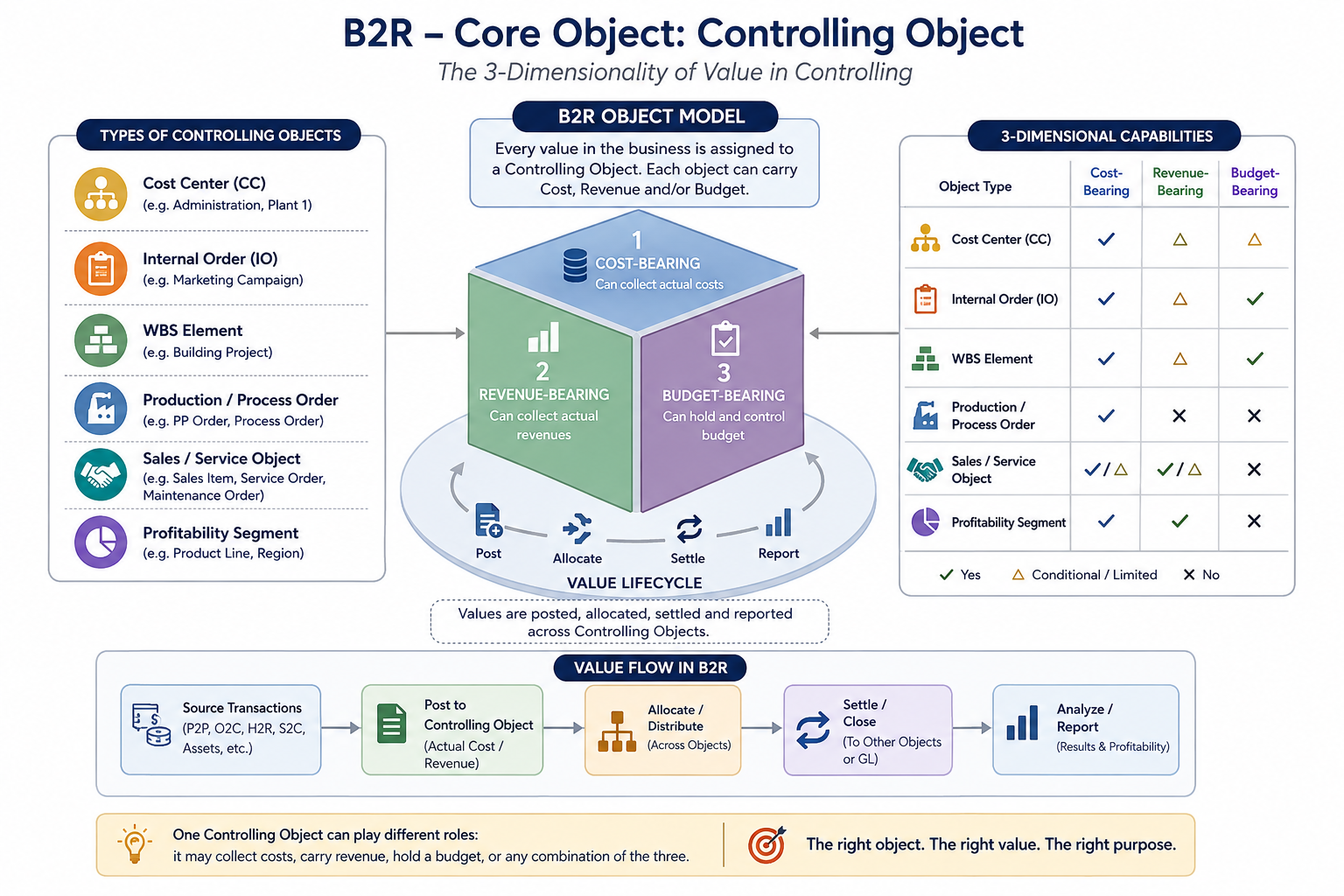
Use the rail that matches the business question. Cost centers and internal orders are common operating-cost objects; PS WBS and networks add project execution depth; PP production orders as cost evidence complete the production-control view. B2R retains the authority and availability view while Controlling and operations retain their native cost collection, allocation, settlement, and status logic.
THREE PRACTICAL CONTROL RAILS
Start with operating cost, then govern and extend it
These are additive control rails, not industry labels. Start with recurring operating cost, apply the budget-control rail, then add project, capital, or production objects only when the business needs them.
Cost centers and internal orders
Build a cost-center hierarchy, plan period cost manually or by upload, and compare plan, commitment, and actual. Use internal orders for temporary cross-cost-center or cross-year activity, then settle cost back to the responsible cost centers.
Authority, release, and availability
Turn planned demand into an approved budget baseline, release the amount available for use, control commitments and actuals, govern changes, and report the current budget position.
PS WBS, networks, and PP orders
Add PS for project or capital work and PP for production cost collection, WIP, variance, and settlement where the selected cost objects require them. Rail 1 and Rail 2 remain the common control foundation.
OBJECT RESPONSIBILITY
Keep scope, authority, consumption, and action distinct
Proposal, budget, release, commitment, actual, forecast, and report are different records. Each layer owns a different question, decision, and proof.
Budget object and owner
The object defines accountability, scope, period, currency, and the relevant policy or funding source.
Baseline and release
The approved budget records the authority; release makes some or all of it currently available for the defined scope.
Commitment and actual
A requisition, order, contract, payroll, project event, or journal can create future or booked consumption at the governed object.
Check, exception, and action
An availability check compares the control basis with consumption and routes warnings, blocks, or escalation to an accountable resolution.
SIX TERMS — SIX DIFFERENT RECORDS
Do not use plan, budget, release, and consumption interchangeably
For a costing analyst, these are different questions, records, owners, and controls. The labels and technical implementation vary by SAP scope, but the distinction must remain visible.
Expected cost and quantity by cost center, activity, order, project, or product. It supports rates, plan/actual analysis, and operational management; it is not spending authority.
The approved funding or spending limit for the governed budget object, period, and scope. It is the authorized amount, not simply the latest operational plan.
The portion of approved budget made available now, often subject to timing, procurement, or funding conditions. Approved does not always mean released.
A future obligation such as a requisition, purchase order, or contract. It may reduce available budget before an accounting actual exists.
The booked financial and management-accounting value from payroll, invoice, goods movement, confirmation, journal, or another source event.
The best current estimate of the outcome. It can trigger a budget request or management action, but it cannot overwrite the approved baseline or release.
Cost-center planning commonly provides plan/actual control. Formal budget availability control is normally designed explicitly for the chosen scope—often a WBS, internal order, fund, or another approved budget object—not assumed just because a cost plan exists.
ONE REQUEST, SEVERAL CONTROL RECORDS
How a business need becomes a budget position
Arrows show a typical relationship, not a universal SAP document chain. Configuration determines the document types, timing, and availability basis.
Propose the need
A business owner submits drivers, amount, phasing, scope, and evidence against a responsible object.
Approve and release capacity
The approved baseline and release record the amount that is permitted and currently available.
Create commitments and actuals
Operational documents and accounting events record expected or booked consumption at the governed object.
Resolve the availability result
The control compares authority with consumption, routes exceptions, and updates the budget statement and forward outlook.
One owner can have many documents
One budget object can receive many proposals, releases, commitments, actuals, and changes. Do not infer a one-document relationship from one report line.
Released is not consumed
Release makes an authorized amount available. Commitment and actual measure use; the policy decides how each reduces availability.
Forecast is not an override
FP&A can show an emerging overrun. A transfer, supplement, or return still needs its own budget-change authorization.
DIAGNOSTIC EVIDENCE
Ask at the correct object level
“The budget is wrong” can be an ownership, authorization, release, consumption, check, or report-scope issue. Start with the last trusted record.
Owner, scope, version, period, baseline, release, approval, and change history explain what is authorized.
Source document, commitment or actual type, assignment, status, amount, date, reversal, and late-posting treatment explain use.
Control basis, available amount, tolerance result, exception, decision, owner, due date, and forecast implication explain the response.
WORKED EXAMPLE
One equipment replacement request
A plant manager proposes a replacement against a maintenance program. After approval, part of the annual amount is released. A requisition creates a commitment and the supplier invoice becomes an actual. An availability warning prompts an approved transfer from a deferred activity. The report preserves every movement while FP&A reflects the revised outlook.
- One controlled object can have multiple authority and consumption records
- Commitment and actual remain distinct evidence
- An exception is resolved through an authorized change
- The forecast explains impact without rewriting budget history
SAP REFERENCE BOUNDARY
Validate the selected solution
Budget availability control, planning functions, workflows, and planning products vary by SAP edition, release, and licensed scope.
Use the model to trace preparation, approval, consumption, exceptions, and reporting through the period.